Showing posts with label Blogging. Show all posts

Sunday, January 19, 2014

How to Notify Web Crawlers to Crawl your Blog for New content

12:14 PM Unknown
Google and other serach engines are the best source of visitors for any blog. The traffic from search engines is Organic i.e only visitors who are interested in your content will visit your site, which increase the chance that the visitor will come back again or spend more time then usualon your Blog. For average sites , Google and other search engine crawlers , crawl site once in a period of 2-3 days. Which , means you need to wait for days to get your new content listed. Although, to get spontaneous listings you can ping web-crawlers by yourself to get listings within hours.
Ping Web Crawlers to Crawl website or Blog manually
So, here is a service by which you can Ping Crawlers manually and ask them to crawl you site , instead of waiting for an automated crawl.

What is PinGoat

PinGoat is a service that notifies a number of blog crawlers and services about the availability you new content on your blog. Pingoat externally pings web-crawlers to blist your site , and Hence your updated content will be in serach results very soon before they actually get listed. 

How to Ping

Manually Ping Web crawlers to list your content
  • Visit the site [http://www.pingoat.net/] and Enter your Blog name and Url to submit.
  • Select the crawlers and services you want to ping and Hit "Go Pingoat".

Is it Safe to you Pingoat

Yes , using Pingoat to initiate web crawling is 100% safe and doesn't't effect your site ranking on search engines.


Wednesday, January 15, 2014

Remove Automatic appending of Blog title in post Titles

9:45 PM Unknown
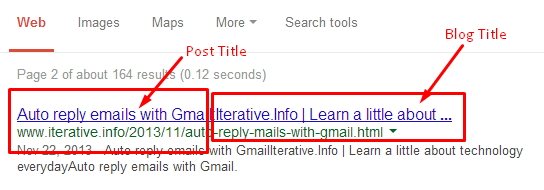
If you are a blogger and care about your SEO [ Search Engine Optimization ] you must have seen Blogger automatically appends you Blog's title to the Tilte of every of your post. I.e Your Post title becomes Post-Title ~ Blog TitleThis seems to make organic search results odd as every result will contain you blog title too with the title of post and also make your link posts on Facebook and other social networking site less prominent.
Editing Blogger Templates
Editing Blogger Template

Remove auto appending of Blog Title after Blog Post

Results of Auto appending of Blog Title woth Post title
  • Login to your Blogger account and Go to [ Blog > Template > Edit HTML ] to edit your template.
  • Now watch top lines of the code carefully , you will find something like :
<b:else>
<title><data.blog.pageNAME/> ~ <data.blog.title/> </tile>
  • Now you need to remove [ ~ <data.blog.title> from the <title> tag and save the template.
Remove Blog Title from every post's title
  • Now , you have successfully removed the auto-appending of Blog title to every post's title. You search results will automatically adjust the changes and make the results more organic.


Monday, November 25, 2013

Remove Non-removable Widgets from Blogger Template

9:38 PM Unknown

Most of the times while we download free templates to make our blog look professional.We get a lot of non-removable widgets pre-attached with templates which annoys or destroys the niche of blog. Although from Blogger Layout Tab , the widgets are non-removable, yet we can remove the widgets from the template source. So, here is an simple method to remove non-removable widgets from blogger.
 
Blogger Non-removable Widget conversion to removable Widget
Steps to remove :
  • Login to Blogger Dashboard , [ Template > Edit HTML ]
  • Now press ctrl+ F [ Find ] and type [ </b:widgets> ] . You will get something like the snapshot.
Blogger Edit Html 
  • Now change all [ locked='true' to locked='false' ] and Save template.
  • Refresh the dashboard , and just see the magic. All widgets which previously doesn't have  option to remove them now contain the option to remove.
Removable Widget Blogger